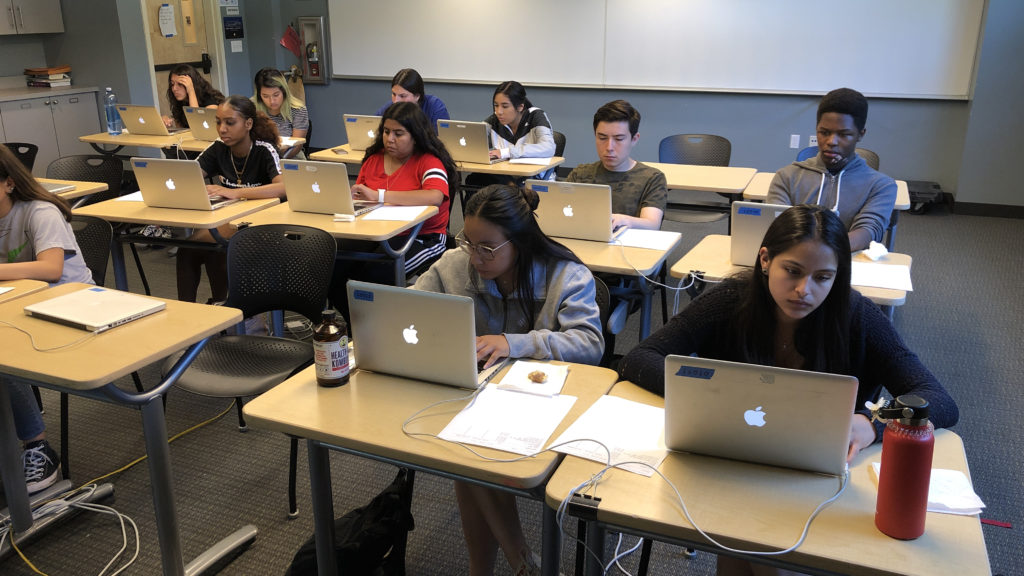
Open to Change

By rwhite, May 30, 2010 12:08 pm

Open to Change

2010-05-30

by Richard White

It’s a fine line to walk, finding out what works for one’s self, but being open to change.

I found out the hard way a while ago, when, after 15 years of experience “mastering my craft” teaching in a number of different California schools, public and private, I had the good fortune to be able to invite a series of student teachers to share my classroom with me. On their worst days in my classroom, they left school defeated, nursing a sad feeling that they’d chosen to enter the wrong profession (been there, done that). On their best days, though, they blew me out of the water with their enthusiasm, their brilliant ideas, and outstanding teaching that left ME wondering if I it wasn’t time to turn in my lesson plans and go do something else. I learned very quickly that, when working with a student teacher, the best approach for me was to 1) listen to their ideas, 2) offer the wisdom of my own experience, and 3) shut up and get out of the way. Some days there would be post-lesson damage control to be done (for the students AND the student-teacher), but most days I’d walk away with a great new lesson/unit/teaching strategy that I could add to my bag of tricks.

Don’t get me wrong, though: working with a student teacher, when it’s done right, is a difficult and time-consuming process. The hardest part for me was always number 3 above, the shutting up. I mean, doesn’t this person know how much experience I have? Don’t they see how strong I am in the classroom? Don’t they realize how GOOD I am??! Of course, there are lots of different ways to be good, and what works for me isn’t going to work for someone else. There are lots of different strategies that can be employed in effective teaching, and I need to be open to the possibilities. I need to be open to the idea of changing some aspects of what I do, especially if there’s something better out there.

That’s the theory. The reality is that, especially as one spends a few years in the game, one gets invested in one’s system. To think about it from a media perspective, the carbon copies I used for my first lessons had to be typed into WordPerfect files, and then had to be retyped into ClarisWorks files, which fortunately were auto-translated into AppleWorks files, which required some finagling to be reformatted at Word .doc files, which are going to have to be completely redone (perhaps?) as LaTeX files… The time and energy that one spends in developing and presenting content has its own inertial legacy that becomes increasingly difficult to challenge.

At the level of the classroom itself: Do you make your notes available to students? Do you require students to take their own notes? Do you post your classroom content on the Internet? Do you allow students to take pictures of your notes? What about recording lectures?

We need to be open to the idea that students are developing new ways of acquiring and processing the information and procedures that we share with them. The “old way” of doing things isn’t necessarily the “best way,” although—and here’s the tricky part—it MIGHT be a really good way, and something that IS going to work for most of your students!

And there’s the rub. We have our years of experience that we are charged with using to help our students, but we have to be willing to accept that something new MIGHT be better, without yet knowing whether it really is or not.

My only advice here is to be willing to have the conversation. If students ask for your content to be made available online, consider doing that. If students want to take photos of classroom work, consider it. Why wouldn’t you want to allow that? Are you afraid that someone might actually get a copy of that information and… learn something??!

Oh, the horror! :)

Teachers: were curators, now filters

By rwhite, May 20, 2010 12:44 pm

Teachers: were curators, now filters

2010-05-20

by Richard White

I’ve had the good fortune in the last few weeks to run into a number of former students, including Megan, Danny, Eric, and David. These students, since I had the opportunity to teach them as long as ten years ago, have gone on to enjoy many successes in life, in lots of different ways. One was a reporter for the Washington Post, and embedded in Iraq for awhile. One worked at Apple before going on to work at a start-up. One is a few weeks away from finishing a doctorate in Electrical Engineering, and one is doing Ph.D. work on lasers at Caltech.

During a recent visit from Danny, we had a great chance to talk about the changing nature of the profession of teaching. It used to be that the teacher was a curator of sorts. One of the primary jobs of the teacher was to assemble information from a number of sources—textbooks, personal experience, encyclopedias, professionals; sources that the student might not ordinarily have access to—and present that information to the student, for consumption or manipulation. It was a good life, but a bit labor intensive, in many ways. Being a “teacher as curator” required a lot of management and coordination of resources.

Those days, for many teachers, are long gone. All that information from all those sources is, to a great extent, now available via an enormous firehose. Maybe you’ve heard of my friend Mr. Internet? Online textbooks, professional blogs, Wikipedia, corporate websites, educational websites, all contain enormous amounts of information, and provide the opportunity to learn from and converse with people in just about every field. Any teacher, with 15-minutes of googling and fact-checking, can assemble hundreds of links to quality information that can be used by students to guide their learning.

One of the new jobs for the teacher, then, is to manage that firehouse for our students. One of our new jobs is to reduce the number of hits from any given Google search from “thousands”—an overwhelming number that really doesn’t help anyone—down to a dozen or so.

I’ve got to admit, I used to scoff at the idea of a programmed WebQuest, dismissing it as just a way for teachers to repackage some of their old content in a new medium. I’m starting to realize, though, that telling my programming students only that “you need to use Google to find resources that will help you program a game in Python” is a bit vague; it leaves too much to chance and will almost certainly result in a certain amount of time wasted.

Part of my job, then, is assemble resources for them, not by collecting materials they wouldn’t otherwise have, but by pre-sorting the materials that they already have (via the Internet). A smaller subset of websites, etc., delivered in class or made available on the course website, helps to narrow down the places they need to dig through, and allows for a more efficient use of class/study time.

Setting up filters

By rwhite, May 14, 2010 11:57 pm

SETTING UP FILTERS

by Richard White

2010-05-14

Too many computers. Not the average teacher's desk.


Sounds like a pretty technical article here: “Setting up Filters.” That could refer to spam filters, or search result filters, or filtering content to restrict the types of webpages that are being delivered to students at your school’s network. All discussion worthy, but… today, I’m thinking about personal filters.

Let’s look at how you can set up filters in your personal/professional life, filters that allow you to focus on the good stuff coming through—the things that you want or need to focus on—without being distracted by the bad stuff:things that are only going to interfere with your job/life/effectiveness.

Because the reality—our reality—is that there are simply too many channels for input in our lives, and no one is able to manage that firehose unaided. No one. Not me, not you, not your multitasking, ADHD, twenty-something friend living on espressos and Monster drinks.

You’ve almost certainly already taken advantage of some of the coping strategies that have been made available to you: your email client (I use Apple’s Mail.app) or webmail provider (gmail) already has spam filters built in, lucky for us.

If you’re feeling a little overwhelmed lately, here are some options to consider:

  • Reduce your networks
    Social and professional networks allow us to be more connected than ever. Feature? Yup. Feature AND flaw. More connections are good up to a point, but you’ve got a limited amount of time and energy. If you can’t monitor what’s happening in Facebook, your Ning accounts, your LinkedIn account,… why belong to all of them?
  • Reduce your peripherals
    This could run the gamut, from that extra printer that needs to be recycled to the bluetooth mouse you hardly ever use, from the old cellphone (recycle it!) to the extra car that you no longer use. Get rid of all that extra crap that you keep moving from one corner of your desk to another, and free up some CPU cycles.
  • Reduce distractions
    There’s ample documentation on the web that getting any actual… you know, WORK… done while you’re AT work is a Herculean /Sisyphean/Greek hero-of-your-choice task. Phone calls (work & cell, emails, text messages, chat messages, colleagues stopping by to ask a question, friends stopping by to take a coffee together, all conspire to make it extraordinarily difficult to do what I love most, and what I’m actually paid to do: teaching. Don’t get me wrong. I love the people I work with and the fact that I can socialize with them. But when it’s time to work, you need to find a way to shut out the distractions.

    Turn off email. Close your browser. Silence the cellphone. I still had one colleague who kept coming in to chat at inopportune times, so I got the clever idea of buying a pair of Sennheiser HD 202 headphones that I could pop over my head when I really needed to get work done. I was wearing them when the guy came in earlier this week when the guy came in and and cleared his throat a few times. I pretended I couldn’t hear him. After a few more tries, he poked me on the shoulder to get my attention, forcing me to look up and take off the headphones.

    “Wow, those things really do a good job of keeping out distractions, eh?” he said.

    “Not good enough, apparently…” I said.

    Was that too mean?

  • Reduce complexity
    Life’s a lot more complicated than it used to be, from the television shows we watch to the decisions we have to make as consumers. It makes sense to reduce complexity where possible, in order to save your processing power for the things that are truly important.

    Why carry 7 credit cards in your wallet? Why keep 37 files scattered over your computer’s desktop? Why pay for a landline? Why try to keep your complex schedule in your head, as opposed to on a decent calendar app in your smartphone?

    “You can have anything you want… but you can’t have everything you want.” Figure out what’s important to you, and ditch the rest.

  • Organize your news consumption
    This may seem silly, but I’ve stopped reading newspapers, or at least buying them. It’s hard to justify buying magazines, too. I don’t know how the whole “who’s going to support journalism” thing is going to settle out, but while they’re discussing it, I’ve taken to bookmarking RSS feeds on my laptop, syncing those feeds to my cellphone, and reading the news on the computer/cellphone at convenient times. Less waste, and I have enough different news sources now that I can easily scan the RSS headlines, just like I used to scan articles in the newspaper. It’s the new thing.

    Give it a try!

What strategies have you found to simplify your life, things that allow you to filter the distractions in your life so that you can focus on things that are more important to you? Keyboard shortcuts? Cutting your cable service? Ditching your smartphone?

How Learning is Changing

By rwhite, April 19, 2010 11:30 pm

Will Richardson, over at weblogge-ed.com, says that the notion of school is changing, and I’d like to believe him. He quotes the New Media Consortium’s K-12 Horizon Report, and in particular highlights these two points:

There is increasing interest in just-in-time, alternate, or non-formal avenues of education, such as online learning, mentoring, and independent study. More and more, the notion of the school as the seat of educational practice is changing as learners avail themselves of learning opportunities from other sources. There is a tremendous opportunity for schools to work hand-in-hand with alternate sources, to examine traditional approaches, and to reevaluate the content and experiences they are able to offer.

The way we think of learning environments is changing. Traditionally, a learning environment has been a physical space, but the idea of what constitutes a learning environment is changing. The “spaces” where students learn are becoming more community-driven, interdisciplinary, and supported by technologies that engage virtual communication and collaboration. This changing concept of the learning environment has clear implications for schools.

These kinds of comments, particularly from a report sponsored by Hewlett-Packard, have to be taken with a grain of salt, but I think it’s safe to say that my own experiences affirm them. Bobby Samuels, one of my top AP Physics students, revealed last week the secret to his success on tests: “I just go over the PowerPoint slides that you post on the website. That helps a lot.” Other students appreciate the availability of homework solutions to assist them with some of the “just in time” learning that Mr. Richardson mentions above.

And most recently, I’ve been posting full source code for assignments in the computer programming elective that I’m teaching this year. That doesn’t appear to have been quite as successful an enterprise; you can chalk that up to second-semester senioritis among the 12th graders in there, or the fact that this is the first time I’ve taught the course. (I’ll take the blame this year, and we’ll see how it goes next time.)

The most significant example of distance learning, for me, remains the LearnAPphysics.com website that I run, which as of this writing has over 1630 subscribers from around the world. It doesn’t have the full-fledged status of a “learning community” that Will probably wants—it’s a one-way delivery of practice problems rather than a truly interactive process—but it’s a clear example of how students are reaching out to develop their own strategies, and finding their own tools to guide their learning.

The range of people using that site runs the gamut, from high school students in the States who are reviewing for a test the next day, to this 66-year old gentleman from India, a principal of an elementary school there who has become interested in pursuing his own study of physics.

I don’t see bricks-and-mortar education going away any time soon—for all our Googling and Wikipedia, we still seem pretty attached to the idea of “school as place.” But that may be starting to change…

Nose, Face, Spite. Fast-twitching.

By rwhite, April 11, 2010 12:28 am

Nose, Face, Spite. Fast-twitching.

2010-04-10

by Richard White

The curse of the fast-twitch response neural response (and I’m perfectly aware that I’m mixing a muscle property with brain activity in that metaphor, but go with me on this), is that emotions can blaze along as quickly as thinking does. I like to think that I’m relatively quick in grasping the fundamentals of a problem, or seeing through a tangle of talking points to a logical conclusion, but I occasionally find myself at the mercy of sudden and strong emotional responses to situations.

Ask teacher/fellow-geek Aaron about the little jaw twitch I get right before I freak out. He’s seen me in enough stressful situations to know the warning signs.

I’m not twitching right now, but I was a little troubled last night to read this bit of news from the well-connected John Gruber:

A few months ago, I heard suggestions that Apple had tentative plans to release a developer beta of Mac OS X 10.7 at WWDC this June. That is no longer the case. Mac OS X 10.7 development continues, but with a reduced team and an unknown schedule. It’s my educated guess that there will be no 10.7 news at WWDC this year, and probably none until WWDC 2011.

Apple’s company-wide focus has since been focused intensely on one thing: iPhone OS 4.1 The number one priority at Apple is to grow mobile market share faster than Android. Anything that is not directly competitive with Android is on the back burner.

Okay. That’s not good.

My deal with Apple is simply this: deliver products that are better than the competition by a factor of two or three, products that make me happily spend top dollar for their outstanding quality and Apple’s superior customer support. Do that, and I’m your fan-boy. Ever since I switched to Apple from the PC world almost 20 years ago, they have delivered on that promise.

And for the moment, I guess they still are, although the iPad isn’t part of that promise for me. Nor the iPod, nor the iPhone. For me, Apple’s superiority has been its hardware and its software, all built around the rock solid OS X, running on top of the Darwin flavor of UNIX. It’s been a great ride, and I owe so much of my own technological workflow to those, and the third-party apps built for that ecosystem.

If Gruber’s intuition is true, though, any significant growth or evolution in that ecosystem has been stunted, as all hands on Cupertino’s deck rush toward the various mobile platforms—iPhone and iPad. I’m not saying that they shouldn’t devote significant attention to that front: I’m an Apple stockholder, and while the rest of the world is struggling to emerge from that “economic downturn”, AAPL is doing just fine, thank you. When I wear my investor hat, I’m a happy man.

But put on my technology hat and I start to get a little worried. Development on the new operating system, as mentioned above, has apparently slowed or stopped completely. And the top-of-the-line laptops haven’t come out with a significant refresh in years. I used to be an an 18-month hardware upgrade cycle, based both on the release cycle from Apple and the amount of stress I put on my machine, carrying it back and forth to school, to classes, to office, to home… The machine I’m composing this post on is almost three years old. It’s serviceable, but… Apple’s development has slowed in this area as well. Let’s see, three years ago… that was just about the time that the iPhone came out.

Apple is currently struggling to serve two masters: the geeks and the public. Not all of the geeks are real happy right now, and some of them occasionally make noises about jumping ship in favor of other, more open, worlds: Google’s Android-based phone systems, Linux (including my personal favorite, the excellent LinuxMint), etc. Sometimes, they come swimming back to Apple, in a classic case of “I’m sorry… you were right… turns out that the grass isn’t as green over there as I thought it was…”

Regardless of what happens, it’s going to be fascinating to watch.

I’ve been told as an investor that I need to be smart, and not think with my heart. For years I’ve invested in Apple more as a result of my strong belief in their products rather than any deep financial analysis. I suppose it’s a bit ironic that, with their stock at an all-time high, I find myself believing in them a little less than I did before.

At least until the new MacBook Pros come out.

Me, next week, when that happens: “Oooooh! Shiny!!! I love Apple!!!”

Ah, the curse of the fast-twitch neuron.

iPad: What’s it to you?

By rwhite, April 10, 2010 3:28 pm

iPad: What’s It to You?

2010-04-09

by Richard White

I’ve had my iPad for just about 5 days now, which means I’ve started to figure out a little bit about what it means to me.

The biggest question most people have, before they’ve used it anyway, is: “What is this? Is it just a big iPod Touch?” I think one of the really cool things about this new device—and I think it’s fair to call it “new”; like most Apple products, it’s not technically a new device, but Apple has gone and made this thing so well that it IS new, for all intents and purposes—is that it can be different things for different people.

  • It’s a big iPod Touch
    It plays games and movies like nobody’s business. Two days ago, I made the mistake of leaving it out on my desk at school. When I returned an hour later and started it up, the game “Plants and Zombies” started up, with a “Welcome back, Matthew” opening screen. “Uh, I hope you don’t mind, Mr. White—I didn’t want to mess up your game, so I made my own game account on their,” explained Matthew, a little embarrassed.
  • It’s a small computer / netbook killer
    Netbooks, for some people, have been the ideal device for light-duty computing: answering email, surfing the web, working on cloud-based documents, or doing some light word processing. The iPad does at least the first three really, really well. And it’s a super-sexy chick magnet, so… that’s worth the price of admission right there.

  • It’s a book reading Kindle Killer
    It’s true, the plastic, gray-scale Kindle is doomed. The iPad’s ability to display epub-format books beats the competition all up and down the block. Colors are crisp, the page turn motion is realistic (if that kind of thing is important to you), and their bookshelf metaphor (ripped off from Delicious Monster’s amazing Delicious Library) is stunning. It beats the heck out of sitting in bed reading the dishwater-gray Kindle with a freaking reading light clipped to the screen.
  • It’s a Media Consumption Device
    Music, books, and especially movies are SO good on this. How good? Last night I sat on the couch with my girlfriend and her son watching “WarGames” on this machine, streaming over the wireless via Netflix. The giant wall-mounted flat screen hooked up to DirectTV? Yeah, it didn’t even get turned on…
  • It’s the Next Big Thing
    Awesome 10-hour battery life, a cool running processor, blazing fast graphics, bright screen, razor-sharp touch interface… It all screams “I am the future!” At least if you’re into consuming media.

I’m not that guy, though—I’m not the media consumption guy. I don’t typically play games on my computer, except for the World of Warcraft years… but there’s no app for that on the iPad. I don’t usually watch movies on my computer. I do record movies on my camera and edit them on my laptop… but you can’t do that on the iPad. I surf a little on the web, but I also create content for the web… and you can’t easily do that on the iPad. I edit Word documents, and you can’t do that in any serious way on the iPad. I do computer-based presentations (PowerPoint/Keynote) for my students… and the iPad has only limited functionality in that area.

I talk a lot about workflow, so what I’m saying is this: I like the iPad in a lot of ways, but it’s not as useful to me for my own workflow.

Not yet. I’m willing to wait a bit.

In the meantime, I’m not the only guy who’s trying to figure out if this is “my thing.”

iPad

By rwhite, April 8, 2010 8:38 pm

iPad

2010-04-08

by Richard White

So… yeah. I bought an iPad.

I pre-ordered, and got in line at 6am to hang out with some other really nice people, including Carlos, the youth minister to gang-bangers, and Abraham Peters, who graciously took a picture of all of us standing in line, and the German guy from London, who happened to find himself in the States at the right time and managed to buy a reservation from some guy on Craigslist.

I bought two iPads, actually: one for myself, because I’m an Ed Tech guy, and I have a feeling this is going to be a Very Big Deal. And one for my Dad, because this thing is so made for him.

Picture my Dad, hunched over in the cold, drafty office, reading the online New York Times every morning on an ancient computer screen. Eventually he gets up, rubs his lower back, and heads off into the kitchen where he’ll make some breakfast, sit down at the table, and settle in to read the local newsrag, a pitiful thing that barely qualifies as journalism.

The iPad was made for my Dad. Now, he’s eating his eggs and reading the New York Times online on the blazing bright LED screen, flipping through articles, and emailing me the ones that he especially likes. It’s business as usual… only infinitely better.

We sat on the couch and watched an episode of “Glee” together—he’d never seen it before, and absolutely loved it. We set up Netflix streaming for him. We looked at the books in the online bookstore. At the rate we were going, I’ll be surprised if he ever gets on the computer again, unless it’s to sync his most recent photos to the iPad. Then he’ll unplug, them pack up the little tablet, and take it to my Mom to give her a slide show on the thing.

As for me and my iPad? I’m not as much of a convert. You can read the excellent comments of David Pogue, or John Gruber, or Andy Ihnatko, or this excellent article at Ars Technica, and they say more or less what I say: it’s fast. It’s beautiful. It represents, for many people, the future of computing, where our devices are powerful, and simple, and seamlessly integrated into our lives to the point that we have a hard time remembering what life was like without them. I don’t doubt that that’s going to happen. In fact, I hope it happens—I have a little money invested in Apple, and my son is starting college next year.

But as of this writing, it doesn’t seem to be my thing. It’s a great machine for consuming content, there’s no denying; YouTube never looked so good. But for content creators like myself, or anyone who needs a little more control over their computer—anyone who wants to drive a stickshift—the iPad’s automatic transmission is probably going to be a frustrating experience.

  • Want to read a PDF document? You’ll have to email it to yourself, or use a third-party app to get it onto the iPhone’s hermetically-sealed file system.
  • Want to edit a Word document? You’ll have to buy the $9.99 neutered version of iWork’s Pages, open up the document in that, edit it, then “Save As…” a Word document, plug in your iPad to your main computer, use iTunes to Export a copy of the document, and then fix any fonts, formatting, or layout that got changed in the process.
  • Want to backup your files? Well, you sort of back them up every time you sync, although you can’t actually restore an individual file. You can make a copy of a file from the iPad (for a limited number of applications) by exporting, but you’ll have to go through and do that on a file by file basis. There’s no facility for backing up the entire machine and restoring individual files.

I don’t want to complain too loudly; any device manufacturer on the planet would KILL to have a product like this in their stable. And I totally get that this is going to be a hit.

Facebook’s a hit, too, though. That doesn’t necessarily mean that it’s something that fits my lifestyle, or my workflow.

The typing I do, the websites that I design, the video editing I do, the podcasts I record, the DVDs I rip, the music I record and mix, the presentations I deliver, the programming I do… none of those exist in the world of the iPad in any meaningful way.

And yet…

It’s a very import development, technologically, and I’m looking forward to seeing where we go from here.

It’s an exciting time to be a technologist.

“Give it away, give it away, give it away now!”

By rwhite, February 11, 2010 8:49 pm


“Give it away, give it away, give it away now!”

2010-02-11

Richard White

We’re talking about wireless access today, with thanks to the Red Hot Chili Peppers for pleading our case so succinctly. Wireless access at high schools needs to be freely, openly available. Here’s why.

1. Schools exist to help students learn, and learn how to learn.

… and increasingly, that learning requires—or at the very least makes use of—the Internet. From videos of science demonstrations to textbook websites, from email to social networking, from “just surfing” to last-minute instructions during a teacher absence, our students are growing up in an increasingly sophisticated world that asks them to be technologically savvy, and requires them to be able to manage multiple short- and long-term tasks. Even if you, Hansel, still keep your appointments in a Day Planner, spilling a little trail of paper-based reminders behind you wherever you go, that’s not how the rest of the world works now. Students do work—homework, reports, research—on laptops, and some students bring those machines to school in order to get additional work done. Then need to be connected to the Internet!

Why, as educators, would we stand in the way of that?

2. A closed network is futile.

Students who are unable to access the Internet via a computer may easily do so through a cellphone, and increasingly via dataphones such as the iPhone, the “Google phone” (HTC Nexus One), and the like. We’re not protecting them from Facebook, or instant messaging, or Twitter, or porn. We’re just making it harder for them to do the things that they do need to do.

The Zona Rosa Café, not far from my house, refuses to offer a wireless signal for its patrons. The owner states that he doesn’t want “that kind of café”—he wants one that’s more interactive, more social. He’s free to run his business as he wishes, of course, but you can guess what his clients, many of them students, do: they sit there typing away on their non-networked computers, or surfing the Internet anyway on their phones.

As educators with a progressive stance on the use of appropriate technology in a learning environment, why would we cripple our students with less-than-complete access? What does it say to our students when they can get a better Internet connection on their own cellphone than they can through an over-filtered school laptop?

We’re not protecting them from anything. We’re just making it inconvenient, and making ourselves look silly in the process.

3. The iPad is coming.

In the humble opinion of many of my fellow, tech-crazed, educators, we’re about to witness a revolution. Apple’s new iPad—available within a couple of months—promises to do to the the plastic, gray-scale Kindle what the iMac did to the PC, what the iPod did to the MP3 player, and what the iPhone did to the cellphone industry. It’s going to leverage people’s familiarity with the power, convenience, and now-familiar multi-touch interface of the iPhone so that the iPad becomes the most successful media player on the planet. Publishers are lining up to deliver iPad customized content, including newspapers (hoping desperately for something, anything that will save their failing industry), and publishers of textbooks (overpriced, and increasingly just downloaded illegally via Bittorrent by cash-poor but tech-savvy college students). Educational materials are a natural for the iPad, and at least one teacher I know of has both a) received a grant to purchase three of them for his classroom, and b) begun the process of developing his own educational materials, to be delivered on the iPad.

Although some models of the iPad are going to have 3G capability, the lower-priced versions (hello, Education Market) are going to have network access only via wireless Internet. Students who want to take advantage of these devices are going to need access to networks, and schools should have a responsibility to provide it, unfettered and unfiltered. (One of my colleagues, using a filtered laptop to search for the lyrics to an old Bob Dylan song, had his search refused by overly-protective software; the text “It Ain’t Me, Babe” contained a dangerous, porn-related keyword.)

So there you have it.

The tech guys at my school work harder than anybody I know to configure the network, deliver computers, assist teachers, and foster the use of technology at my school. They are knowledgeable (not surprising), social (for IT guys!), friendly (really!), and never fail to come through, whether it’s diagnosing a network problem in the middle of class or answering their work phone even when out sick for the day. But I’ve come to believe that they’ve got better things to do than spend their day re-doing proxies and managing MAC address whitelists.

Will there be problems with opening up the network? Absolutely. Students will have to learn how to behave responsibly on the network at school, and sysadmins will need to keep an eye on use (and potential misuse) of the network, as they always do. But opening up the network puts the responsibility for using it wisely squarely on the shoulders of the students—where it should be—rather than on overly twitchy content filters.

Most importantly, though, it gives students the freedom and the power to become more active participants in their own learning.

And that’s what school is all about.

East Bay CUE, Cool Tools VI

By rwhite, February 6, 2010 11:51 am


Aaron and I had a chance to give a presentation at the East Bay CUE Cool Tools VI workshop today in Hayward, CA: Today’s Technology-Enhanced Classroom: From Prep to Delivery, and Beyond!

Here’s a link to the shared Google Doc that includes references from the talk:
http://docs.google.com/Doc?docid=0AY74d11WH3xkZGcydDg5dDVfMTZnaDY1bnhmYg&hl=en

Any questions or comments from attendees at the workshop? Feel free to email me. We had a great time working with you guys!

Analog Development

By rwhite, January 15, 2010 10:09 pm

Analog Development

2009-01-15

by Richard White

I’m a minimalist.

Seems like I’ve been “going light” for most of my life, or at least since I got turned on to backpacking, and started eating everything from cereal to steak out of one of those little Sierra cups that were all the rage back in the 70s. I don’t carry any consumer debt, I don’t check a bag (even flying transcontinental)… and you can still occasionally catch me eating Lucky Charms out of that little cup.

The ultralight ethos only got reinforced when I began preparing live in France for an extended period of time. Books, music, photos, lesson plans… everything got moved onto a 15-inch Titanium PowerBook, and it seems like I’ve been living out of a laptop ever since.

I’ve had lots of reasons for expending the time and energy it takes to transfer old-school paper-based lessons and lesson-plans into digital form. Part of it has to do with the ease of transferring information from one year to the next. I look at some of those “Course Planners” that I used to plan the year with, and remember how I’d painstakingly transfer one year’s schedule into another planner for the following school year (writing in pencil, in anticipation of the inevitable changes that would necessitate last-minute adjustments). I had two large 3-inch binders, one for each semester, in which I’d keep detailed lesson plans, copies of handouts, lab activities, tests, test keys.

It’s all a bit overwhelming when I think back on it now.

I’m reminded, though, of how important those pen-and-paper, “analog” lessons were, now that I’m in the process of developing a new course. You can get all sorts of “planning in analog” advice, from everyone from Nancy Duarte to Garr Reynolds, and they’re right.

There are lots of reasons why it’s good to plan with a pencil and pen. Making diagrams and sketches is almost always easier on paper. Collaborators can easily add to your work (as long as they’re in the same room). Paper is easily transported, and multiple pieces of paper can be easily spread out for examination.

For me, it’s mostly a simple question of real estate. I’ve got a two different calendars that I’m working with, a lesson plan for the day, a textbook propped open—and yes, the laptop opened up—and that allows me to organize the disparate elements of the course and assemble them into something more-or-less cohesive, in a way that clicking back-and-forth among eleven open windows on the tiny screen simply doesn’t allow for.

Imagine me and the Sierra cup, a 10-oz steak flopping over the sides, and sauteed mushrooms dropping onto the ground while friend, fellow backpacker, and chef for the evening Brian laughs hysterically.

The final product for the course I’m working on (a computer science course) will include a website, the lessons (in PowerPoint form), a series of assessments, and a whole lot of code examples and programming assignments, and all of it will eventually live on the laptop.

For now, though, I’m enjoying the paper. The notes. The ballpoint pen. The mess.

It’s all part of the process.

Panorama Theme by Themocracy