Posts tagged: Workflow

Setting up filters

By rwhite, May 14, 2010 11:57 pm

SETTING UP FILTERS

by Richard White

2010-05-14

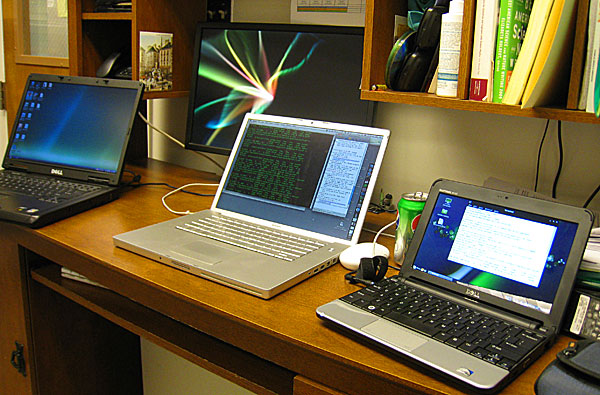
Too many computers. Not the average teacher's desk.


Sounds like a pretty technical article here: “Setting up Filters.” That could refer to spam filters, or search result filters, or filtering content to restrict the types of webpages that are being delivered to students at your school’s network. All discussion worthy, but… today, I’m thinking about personal filters.

Let’s look at how you can set up filters in your personal/professional life, filters that allow you to focus on the good stuff coming through—the things that you want or need to focus on—without being distracted by the bad stuff:things that are only going to interfere with your job/life/effectiveness.

Because the reality—our reality—is that there are simply too many channels for input in our lives, and no one is able to manage that firehose unaided. No one. Not me, not you, not your multitasking, ADHD, twenty-something friend living on espressos and Monster drinks.

You’ve almost certainly already taken advantage of some of the coping strategies that have been made available to you: your email client (I use Apple’s Mail.app) or webmail provider (gmail) already has spam filters built in, lucky for us.

If you’re feeling a little overwhelmed lately, here are some options to consider:

  • Reduce your networks
    Social and professional networks allow us to be more connected than ever. Feature? Yup. Feature AND flaw. More connections are good up to a point, but you’ve got a limited amount of time and energy. If you can’t monitor what’s happening in Facebook, your Ning accounts, your LinkedIn account,… why belong to all of them?
  • Reduce your peripherals
    This could run the gamut, from that extra printer that needs to be recycled to the bluetooth mouse you hardly ever use, from the old cellphone (recycle it!) to the extra car that you no longer use. Get rid of all that extra crap that you keep moving from one corner of your desk to another, and free up some CPU cycles.
  • Reduce distractions
    There’s ample documentation on the web that getting any actual… you know, WORK… done while you’re AT work is a Herculean /Sisyphean/Greek hero-of-your-choice task. Phone calls (work & cell, emails, text messages, chat messages, colleagues stopping by to ask a question, friends stopping by to take a coffee together, all conspire to make it extraordinarily difficult to do what I love most, and what I’m actually paid to do: teaching. Don’t get me wrong. I love the people I work with and the fact that I can socialize with them. But when it’s time to work, you need to find a way to shut out the distractions.

    Turn off email. Close your browser. Silence the cellphone. I still had one colleague who kept coming in to chat at inopportune times, so I got the clever idea of buying a pair of Sennheiser HD 202 headphones that I could pop over my head when I really needed to get work done. I was wearing them when the guy came in earlier this week when the guy came in and and cleared his throat a few times. I pretended I couldn’t hear him. After a few more tries, he poked me on the shoulder to get my attention, forcing me to look up and take off the headphones.

    “Wow, those things really do a good job of keeping out distractions, eh?” he said.

    “Not good enough, apparently…” I said.

    Was that too mean?

  • Reduce complexity
    Life’s a lot more complicated than it used to be, from the television shows we watch to the decisions we have to make as consumers. It makes sense to reduce complexity where possible, in order to save your processing power for the things that are truly important.

    Why carry 7 credit cards in your wallet? Why keep 37 files scattered over your computer’s desktop? Why pay for a landline? Why try to keep your complex schedule in your head, as opposed to on a decent calendar app in your smartphone?

    “You can have anything you want… but you can’t have everything you want.” Figure out what’s important to you, and ditch the rest.

  • Organize your news consumption
    This may seem silly, but I’ve stopped reading newspapers, or at least buying them. It’s hard to justify buying magazines, too. I don’t know how the whole “who’s going to support journalism” thing is going to settle out, but while they’re discussing it, I’ve taken to bookmarking RSS feeds on my laptop, syncing those feeds to my cellphone, and reading the news on the computer/cellphone at convenient times. Less waste, and I have enough different news sources now that I can easily scan the RSS headlines, just like I used to scan articles in the newspaper. It’s the new thing.

    Give it a try!

What strategies have you found to simplify your life, things that allow you to filter the distractions in your life so that you can focus on things that are more important to you? Keyboard shortcuts? Cutting your cable service? Ditching your smartphone?

iPad

By rwhite, April 8, 2010 8:38 pm

iPad

2010-04-08

by Richard White

So… yeah. I bought an iPad.

I pre-ordered, and got in line at 6am to hang out with some other really nice people, including Carlos, the youth minister to gang-bangers, and Abraham Peters, who graciously took a picture of all of us standing in line, and the German guy from London, who happened to find himself in the States at the right time and managed to buy a reservation from some guy on Craigslist.

I bought two iPads, actually: one for myself, because I’m an Ed Tech guy, and I have a feeling this is going to be a Very Big Deal. And one for my Dad, because this thing is so made for him.

Picture my Dad, hunched over in the cold, drafty office, reading the online New York Times every morning on an ancient computer screen. Eventually he gets up, rubs his lower back, and heads off into the kitchen where he’ll make some breakfast, sit down at the table, and settle in to read the local newsrag, a pitiful thing that barely qualifies as journalism.

The iPad was made for my Dad. Now, he’s eating his eggs and reading the New York Times online on the blazing bright LED screen, flipping through articles, and emailing me the ones that he especially likes. It’s business as usual… only infinitely better.

We sat on the couch and watched an episode of “Glee” together—he’d never seen it before, and absolutely loved it. We set up Netflix streaming for him. We looked at the books in the online bookstore. At the rate we were going, I’ll be surprised if he ever gets on the computer again, unless it’s to sync his most recent photos to the iPad. Then he’ll unplug, them pack up the little tablet, and take it to my Mom to give her a slide show on the thing.

As for me and my iPad? I’m not as much of a convert. You can read the excellent comments of David Pogue, or John Gruber, or Andy Ihnatko, or this excellent article at Ars Technica, and they say more or less what I say: it’s fast. It’s beautiful. It represents, for many people, the future of computing, where our devices are powerful, and simple, and seamlessly integrated into our lives to the point that we have a hard time remembering what life was like without them. I don’t doubt that that’s going to happen. In fact, I hope it happens—I have a little money invested in Apple, and my son is starting college next year.

But as of this writing, it doesn’t seem to be my thing. It’s a great machine for consuming content, there’s no denying; YouTube never looked so good. But for content creators like myself, or anyone who needs a little more control over their computer—anyone who wants to drive a stickshift—the iPad’s automatic transmission is probably going to be a frustrating experience.

  • Want to read a PDF document? You’ll have to email it to yourself, or use a third-party app to get it onto the iPhone’s hermetically-sealed file system.
  • Want to edit a Word document? You’ll have to buy the $9.99 neutered version of iWork’s Pages, open up the document in that, edit it, then “Save As…” a Word document, plug in your iPad to your main computer, use iTunes to Export a copy of the document, and then fix any fonts, formatting, or layout that got changed in the process.
  • Want to backup your files? Well, you sort of back them up every time you sync, although you can’t actually restore an individual file. You can make a copy of a file from the iPad (for a limited number of applications) by exporting, but you’ll have to go through and do that on a file by file basis. There’s no facility for backing up the entire machine and restoring individual files.

I don’t want to complain too loudly; any device manufacturer on the planet would KILL to have a product like this in their stable. And I totally get that this is going to be a hit.

Facebook’s a hit, too, though. That doesn’t necessarily mean that it’s something that fits my lifestyle, or my workflow.

The typing I do, the websites that I design, the video editing I do, the podcasts I record, the DVDs I rip, the music I record and mix, the presentations I deliver, the programming I do… none of those exist in the world of the iPad in any meaningful way.

And yet…

It’s a very import development, technologically, and I’m looking forward to seeing where we go from here.

It’s an exciting time to be a technologist.

Panorama Theme by Themocracy